 Design Snap
Recreate a website's design with AI, using its real tokens
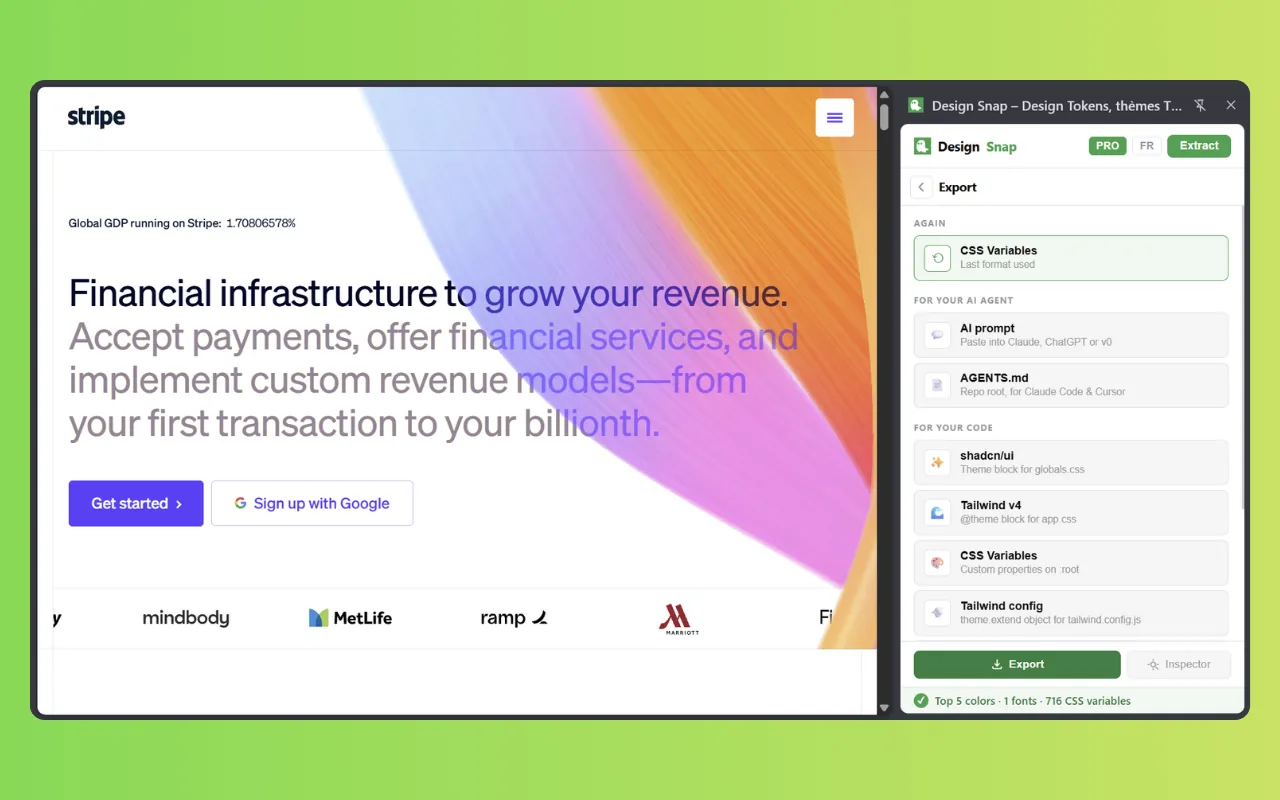
Screenshots make AI models guess: the blue is close but wrong, the radius is off, the font is “something like Inter”. Design Snap is a free Chrome extension that extracts a site's exact design system and packages it for AI — a ready-to-paste prompt for Claude, ChatGPT, v0 or Cursor, or an AGENTS.md file your coding agent re-reads at every session.
Rated 5.0/5 on the Chrome Web Store · read the reviews · Free plan · No account · 100% local analysis
How to give an AI the design of a website
Three steps from a website you like to an AI that builds in its style — with exact values instead of approximations.
-
Extract
Open the website, open Design Snap and press Extract.
-
Export for AI
Choose AI prompt (free) to copy a markdown design brief, or AGENTS.md (PRO) for a file you drop at the root of a repository.
-
Paste and build
Paste the prompt into Claude, ChatGPT, v0, Lovable or Cursor along with what you want built. The agent uses the real tokens.
Why screenshots aren't enough
Vision models are good at layout and bad at exact values. Ask one to rebuild a page from a screenshot and it will estimate colors from compressed pixels, pick a default font, and invent a spacing scale. The result looks related, not right. Giving the model the actual tokens removes the guesswork.
What the AI prompt contains
The AI prompt export is a markdown block written for a model to follow, not just to read:
- Semantic color roles — primary, background, foreground, muted, border — with the real hex values and where each is used.
- Typography, radius, shadow and spacing scales.
- A ready-to-paste CSS block of variables.
- Explicit rules such as “use
bg-primary, neverbg-[#2563eb]”, so generated code references tokens instead of hard-coding values.
AGENTS.md for coding agents
A prompt is used once. Coding agents like Claude Code and Cursor read an AGENTS.md file at the root of a repository at every session. Design Snap's AGENTS.md export (PRO) writes your design system into that file, including an Out of scope section listing what the agent must not invent. Values completed by a fallback are marked as such, so an agent never mistakes a default for a brand color.
Borrow the system, not the brand
“Copy a website's design” should mean learning from its system — the palette structure, the type scale, the restraint in its shadows — then making it yours. Change the hues, swap the fonts, keep the rigor. Don't ship another company's logo, illustrations, copy or trademarked look.
Exact tokens in, consistent UI out
The difference between “inspired by” and “looks off” is usually five hex codes and a radius. Design Snap hands them to your agent.
- AI prompt with semantic color roles and real values — free
AGENTS.mdfor Claude Code, Cursor and other agents — PRO- Rules that make agents use tokens, not hard-coded hex
- Works with Claude, ChatGPT, v0, Lovable, Bolt and Cursor
- 100% local extraction, nothing sent to any server
Copy a design with AI — FAQ
Extract the site with Design Snap, export the AI prompt and paste it into Claude, ChatGPT, v0 or Cursor with a description of what you want built. The model then works from the site's real colors, typography, radii and shadows instead of guessing from a screenshot.
The AI prompt (free) is a markdown block you paste into a chat. AGENTS.md (PRO) is a file you put at the root of a repository so coding agents like Claude Code and Cursor read your design system at every session.
Yes. The AI prompt is plain markdown, so any tool that accepts a text prompt can use it.
Learning from a design system and reusing general values like a type scale is common practice. Copying a brand's logo, illustrations, copy or distinctive trade dress is not. Use the extraction as a starting point and make the result your own.