Extract design tokens from any website
A free Chrome extension that pulls the colors, typography, shadows and CSS variables out of any website — and exports them to Tailwind, shadcn/ui, Figma or your AI agent.
Free · No account · 100% local analysis
Live demo — pick a site
 Design Snap
PRO
Design Snap
PRO
#0f172a
#6366f1
#f8fafc
#f59e0b
#10b981
#64748b
Inter12 · 14 · 16 · 20 · 24 · 32400 · 600 · 7001.2 · 1.4 · 1.66px · 8px · 12px0 1px 2px rgba(0,0,0,.05)0 1px 3px rgba(0,0,0,.1)0 10px 15px rgba(0,0,0,.1)91% · 148 texts2.8:1 · fail3.9:1 · fail#6366f1 → #4f46e5#6366f18px0 1px 2px rgba(0,0,0,.05)Inter, system-uiThat took about a second. Now do it on your own pages.
Add to Chrome — it's freeFree forever · no account · nothing leaves your browser
Real values, read from these sites — the same computed styles the extension reads on your own pages.
- 5.0 rating · 130+ users on the Chrome Web Store
- Full design system extracted in ~1 second
- 100% local — zero tracking
- Chrome side panel · stays open while you browse
- 9 export formats, ready to paste
- English & French interface
What Design Snap extracts
Design Snap turns any live website into a structured design system: colors ranked by real usage, custom typography, unique radii and shadows with previews, and every CSS custom property declared on :root — captured in one click, organized in tabs, ready to export. Version 3 adds a side panel that stays open while you browse, a WCAG contrast audit, live theme editing and an export made for AI agents.
One click extracts a full design system
Press Extract and Design Snap reads the computed styles of the entire page — not one element at a time.
- Colors ranked by actual frequency of use on the page, with hex values
- Typography: custom families only (generic fallbacks are filtered out), sizes, weights, line-heights
- Unique border-radii and box-shadows, each with a live preview
- Every CSS custom property declared on
:root - Every text/background pair on the page checked against WCAG 2.1
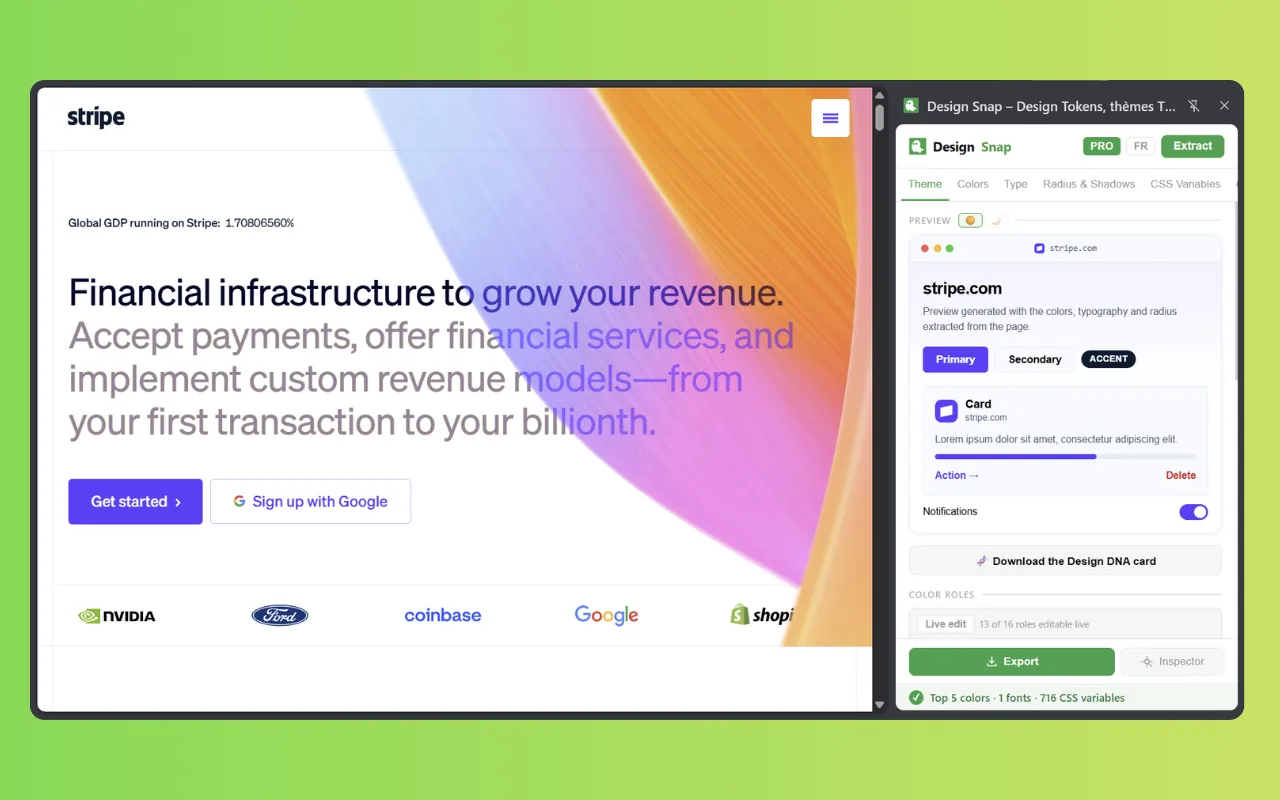
It lives in Chrome's side panel now
Design Snap v3 left the popup behind. The panel docks beside the page and stays open while you browse — scroll, switch tabs, navigate; the tokens stay in view.
- Open it from the toolbar icon, with
Ctrl+Shift+D(⌘⇧Don macOS), or by right-clicking anywhere on the page - Change tab and the panel follows: the new tab's extraction is restored, or the view starts clean
- Inspect an element with its tokens next to it — the panel no longer closes on you
- A loaded snapshot stays on screen whatever tab you move to
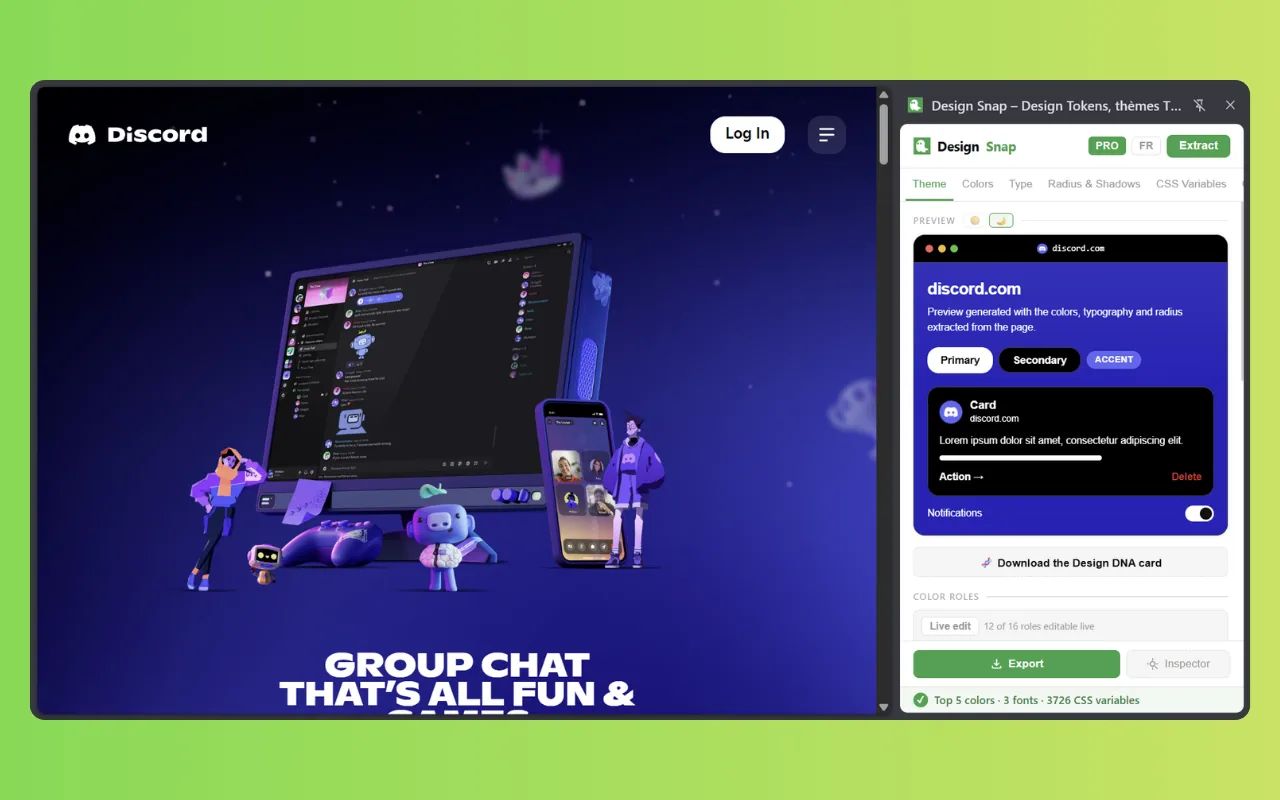
Turn any site into a shadcn/ui, Tailwind v4 or Style Dictionary theme PRO
Design Snap maps the extracted palette to semantic color roles — background, foreground, primary, secondary, muted, border — and generates production-ready theme files.
- shadcn/ui variables ready to paste into
globals.css - Tailwind v4
@themeblock - Standard Style Dictionary v3 tokens (
{ value, type }) for color, dimension, fontFamily, fontWeight, boxShadow and typography — ready for a Style Dictionary build pipeline - The site's real dark mode, extracted automatically — or a coherent generated one if the site has none
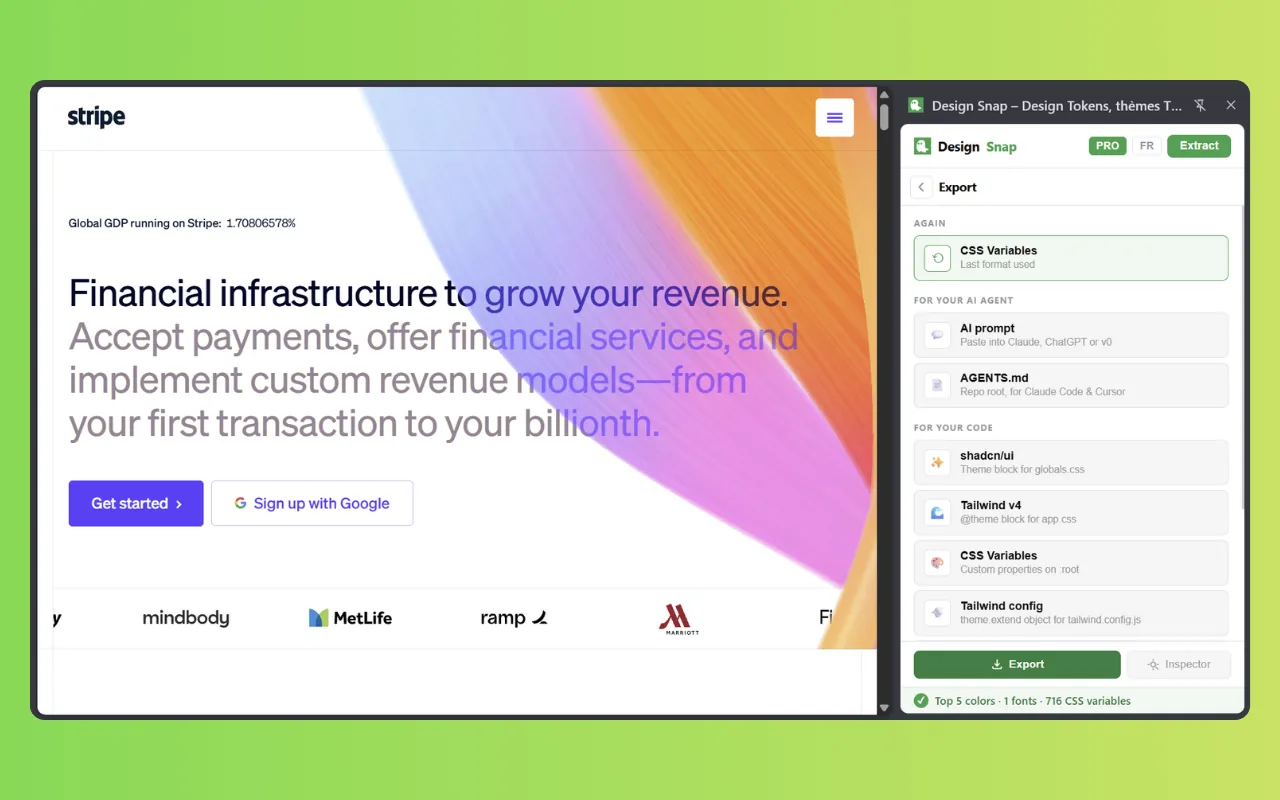
Recolor the real page, then keep the snapshot
The preview rebuilds a mini interface with the exact colors, typography and radii of the page. Then go one step further: edit the theme on the live site, in place.
- Each color role becomes a native color picker — the site repaints as you drag
- Design Snap drives the site's own CSS variables, the way its author would: change
--primaryand the focus ring follows - It says up front how many roles are steerable on this site — before your first click, not after
- Reset returns the page strictly to its original state
- 5 snapshots saved locally on the free plan · unlimited with PRO
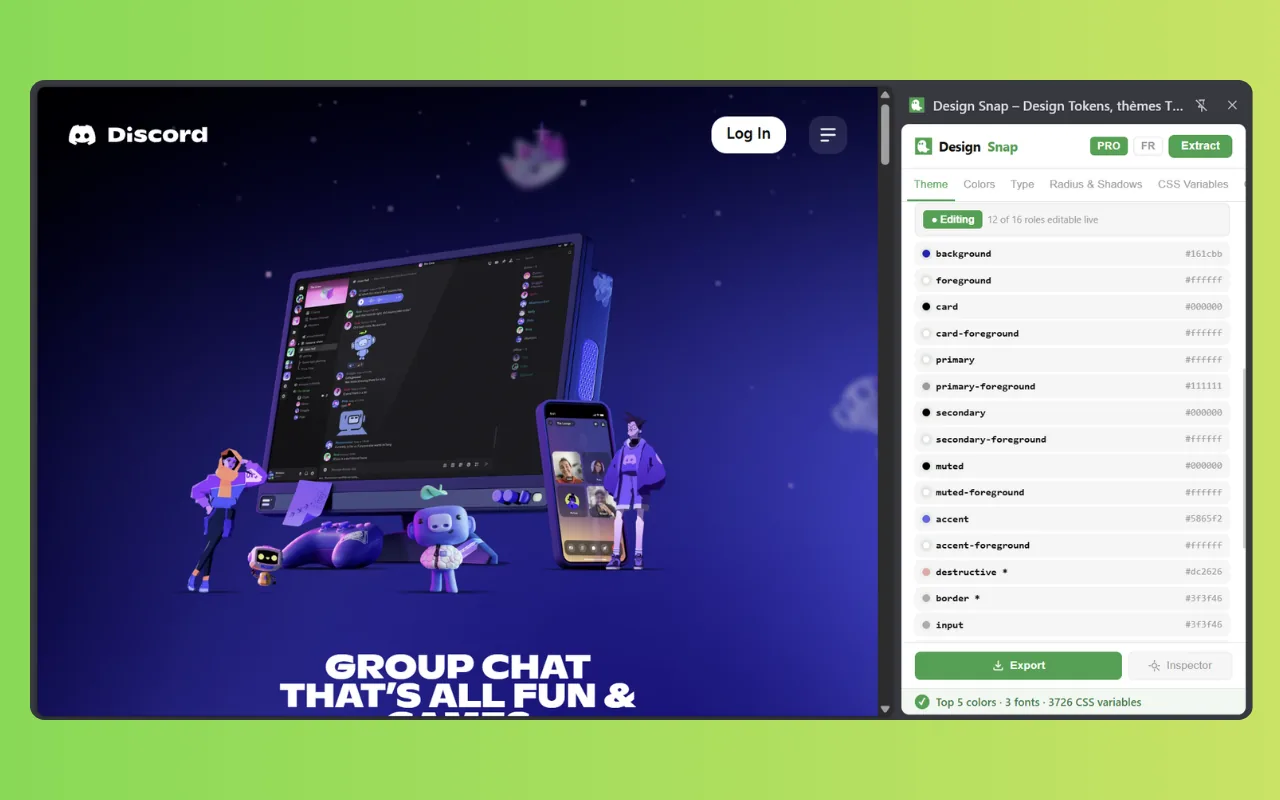
AI prompt & AGENTS.md
A design system your agent can actually follow — the prompt is free, AGENTS.md is PRO.
Use the roles above by name.
Never hardcode a hex.
WCAG contrast audit
Real ratios, composited backgrounds, no guessing. Score free, full report and fixes with PRO.
Live theme preview
See the extracted design system applied to real UI components before you export anything.
Chrome side panel
Docked beside the page, open while you browse. Toolbar icon, Ctrl+Shift+D or right-click.
Real dark modePRO
The site's actual dark variant, extracted — or generated coherently when the site doesn't have one.
Design DNA cardPRO
A downloadable visual card that sums up a site's design system — made to be shared.
Private by design
100% vanilla JS, 0 dependencies, no backend. Analysis never leaves your browser.
0 servers 0 trackers 0 dependencies
Unlimited snapshotsPRO
Every extraction saved locally. Reopen the design system of any site you've already analyzed.
Bilingual interface
The extension and this site exist fully in English and French. Switch anytime.
Export design tokens as Tailwind, shadcn/ui, Style Dictionary, Figma or an AI prompt
Nine formats. Five on the free plan — JSON tokens, CSS variables, tailwind.config.js, Figma (Tokens Studio) and the AI prompt — plus shadcn/ui, Tailwind v4 @theme, a standard Style Dictionary v3 export and AGENTS.md with PRO. Each export is generated ready to paste, no cleanup needed, and the status bar tells you exactly what landed in your clipboard: shadcn/ui — 12 colors · 8 type values · 1 radius.
{
  "color": {
    "primary":    { "value": "#6366f1" },
    "background": { "value": "#f8fafc" }
  },
  "font": {
    "sans": { "value": "Inter" }
  },
  "radius": {
    "md": { "value": "8px" }
  }
}:root {
--color-primary: #6366f1;
--color-background: #f8fafc;
--font-sans: 'Inter', sans-serif;
--radius-md: 8px;
--shadow-sm: 0 1px 3px rgba(0,0,0,.1);
}theme: {
extend: {
colors: {
primary: '#6366f1',
surface: '#f8fafc',
},
fontFamily: { sans: ['Inter'] },
borderRadius: { md: '8px' },
},
}{
"global": {
"color-primary": {
"value": "#6366f1",
"type": "color"
},
"font-sans": {
"value": "Inter",
"type": "fontFamilies"
}
}
}:root {
--background: 0 0% 98%;
--foreground: 222 47% 11%;
--primary: 239 84% 67%;
--primary-foreground: 0 0% 100%;
--muted: 215 20% 65%;
--radius: 0.5rem;
}@theme {
--color-primary: #6366f1;
--color-surface: #f8fafc;
--font-sans: 'Inter', sans-serif;
--radius-md: 8px;
--shadow-sm: 0 1px 3px rgb(0 0 0 / .1);
}{
"color": {
"color-01": { "value": "#6366f1", "type": "color" }
},
"fontFamily": {
"family-1": { "value": "Inter", "type": "fontFamily" }
},
"typography": {
"heading-1": {
"value": { "fontFamily": "Inter", "fontSize": "32px", "fontWeight": "600" },
"type": "typography"
}
}
}## Design system — stripe.com
### Colors
- primary #6366f1 — CTAs, links, focus ring
- background #f8fafc — page surface
- muted #64748b — secondary text
### Type
Inter · 12 · 14 · 16 · 20 · 24 · 32 · 400/600/700
### Rules
Use the roles above by name. Never hardcode a hex.## Tokens
:root {
--primary: #6366f1;
--radius: 8px;
}
## Out of scope
- Do not invent color roles beyond the table above.
- Do not change the type scale.
- Values marked *(fallback)* were not measured.Values above come from a real extraction. Design Snap fills each format with the tokens of the site you analyze.
Deep dives: Tailwind theme generator · shadcn/ui theme generator · Style Dictionary export · extract CSS variables · color palette extractor · vs DevTools & CSS Peeper
Every format above, generated from any site you open.
Add to Chrome — it's free Free forever · no account, no cardHow to extract design tokens from a website
Extracting a website's design tokens with Design Snap takes three steps: install the extension, open the side panel on any page and press Extract, then copy the tokens in the format your stack — or your AI agent — uses. No account, no configuration, and nothing ever leaves your browser.
-
Install
Add Design Snap to Chrome from the Chrome Web Store. Free plan, no account, no sign-up.
-
Extract
Open any website, then open the panel — toolbar icon,
Ctrl+Shift+D, or right-click on the page. Press Extract: colors, fonts, radii, shadows, CSS variables and the contrast audit appear in about a second. -
Export
Copy the tokens as Tailwind config, shadcn/ui theme, Style Dictionary tokens, CSS variables, Figma tokens, an AI prompt or an
AGENTS.mdfile — and paste them into your project.
What designers and developers say about Design Snap
Reviews published on the Chrome Web Store by verified users, quoted here without their names.
“Super useful extension for designers and developers. It makes extracting colors, fonts, CSS styles, and media incredibly quick and easy. The export options are especially helpful, and I love that everything works locally with no tracking.”
“Design Snap makes extracting colors, typography, shadows, and tokens effortless, saving designers and developers valuable time on every project daily.”
“As a developer, this extension lets me draw inspiration from the best sites out there. Approved. ✅”
“Great work on this… Thanks”
Simple pricing, no account required
Two plans, no subscription. Free covers the basics, forever. One €4.99 payment unlocks every PRO feature for life — all future updates included, paid through Polar and activated with a key sent by email.
Free
Everything you need to start
€0
- One-click token extraction
- Colors, type, radii, shadows, :root variables
- 5 export formats (JSON, CSS, Tailwind, Figma, AI prompt)
- Element inspector in the side panel
- WCAG contrast score + 3 worst failures
- Live color editing on the page
- 3 sites/day
- 5 saved snapshots
Free forever · no account, no card
PRO Lifetime
Pay once, PRO for life — no subscription
€4.99 once
- Everything in Free
- Paste tokens straight into shadcn/ui, Tailwind v4 or Style Dictionary — no manual conversion
AGENTS.mdfor Claude Code, Cursor & co — your design system, re-read at every session- The full contrast report, with a suggested fix for every failing pair
- Export a live theme edit as a CSS patch
- Extract the real dark-mode palette, not a guess
- A one-page Design DNA card to share with your team or clients
- Unlimited snapshots — never lose a session's work
- All future updates included, forever
- Move the license between devices
30-day money-back guarantee
License key emailed after purchase · Activate/deactivate per device · Payments by Polar · No account to create · 30-day money-back guarantee on PRO Lifetime
Frequently asked questions
Yes. The free plan includes one-click extraction of colors, typography, radii, shadows and CSS variables, the element inspector, live color editing, a WCAG contrast score, 5 export formats (CSS variables, tailwind.config.js, JSON tokens, Figma tokens and the AI prompt), 3 sites/day and 5 saved snapshots. PRO (€4.99 once, lifetime) adds the shadcn/ui, Tailwind v4 and Style Dictionary v3 exports, the AGENTS.md export, the full contrast report with suggested fixes, real dark-mode extraction, the Design DNA card and unlimited snapshots.
Design Snap reads the computed styles of the page in your active tab, entirely inside your browser. It ranks colors by how often they are actually used, keeps only custom font families, deduplicates border-radii and box-shadows, and lists every CSS custom property declared on :root. One click, about a second.
No. All analysis happens 100% locally in your browser. The only network calls the extension can make are to Google Fonts (to render the theme preview with real typefaces) and to polar.sh (to validate a PRO license key). It never transmits the pages you visit, their content or your browsing history. No analytics, no third-party libraries. Read the full privacy policy.
Nine formats. Free: CSS variables (:root block), a tailwind.config.js theme object, JSON tokens, Figma tokens (Tokens Studio JSON) and an AI prompt — a markdown block you paste into Claude, ChatGPT, v0 or Cursor. PRO adds shadcn/ui semantic variables ready for globals.css, a Tailwind v4 @theme block, a standard Style Dictionary v3 export ({ value, type } tokens for color, dimension, fontFamily, fontWeight, boxShadow and composite typography), and an AGENTS.md file to drop at the root of a repository so a coding agent reads your design system at every session. Every export is generated ready to paste into your project.
PRO adds the shadcn/ui, Tailwind v4 and standard Style Dictionary v3 exports, the AGENTS.md export for coding agents, the full WCAG contrast report with a suggested fix for every failing pair, the export of a live theme edit as a CSS patch, the site's real dark mode extracted automatically (or a coherent generated one if the site has none), the downloadable Design DNA card, and unlimited snapshots. The license key arrives by email after purchase and can be activated or deactivated per device — no account required.
You pay €4.99 once and keep every PRO feature, including future updates, forever. Your key arrives by email right after checkout through Polar and can be moved between devices at any time.
It works on any regular web page Chrome allows extensions to read: production sites, staging environments and localhost. Browser-internal pages (chrome://) and the Chrome Web Store itself are restricted by Chrome for every extension.
DevTools shows the styles of one element at a time. Design Snap analyzes the whole page at once and returns an organized design system: colors ranked by usage, deduplicated typography, radii and shadows, every :root CSS variable and a WCAG contrast audit of the text on the page — already formatted as Tailwind config, shadcn/ui theme, Style Dictionary tokens, Figma tokens or a prompt for an AI agent. It sits in Chrome's side panel, so it stays open while you browse.
No account, ever. The free version installs and works immediately. PRO uses a license key sent by email after purchase; snapshots and the key are stored locally in your browser with chrome.storage.local.
Yes. Design Snap turns an extraction into AI context in two shapes. The AI prompt, free, is a markdown block listing the semantic color roles and where each one is used, the typography, radius, shadow and spacing scales, a ready-to-paste CSS block and explicit rules (bg-primary, never bg-[#2563eb]) — you paste it into Claude, ChatGPT, v0 or Cursor. The AGENTS.md export, PRO, is a file you drop at the root of a repository so Claude Code or Cursor reads your design system at every session, including an Out of scope section that tells the agent what it must not invent. Values completed by a fallback are marked as such, so an agent never mistakes a default for a brand color.
Yes. Design Snap measures the real contrast of the text on the page against WCAG 2.1 (AA 4.5:1, or 3:1 for large text; AAA 7:1). Translucent backgrounds and semi-transparent text are composited before measurement, so the ratio is the one actually rendered, and text sitting on an image or a gradient is reported as skipped rather than guessed. The free plan shows the score and the three worst failures; PRO shows the full list, each with a suggested fix that only moves lightness — your hue and saturation stay untouched.
Since version 3.0.0, Design Snap opens in Chrome's side panel. It stays open while you browse, switch tabs and scroll, so you can inspect a page with its tokens next to it. Open it from the toolbar icon, with Ctrl+Shift+D (⌘⇧D on macOS), or by right-clicking anywhere on a page and choosing Extract the design tokens of this page.
Yes. With PRO, Design Snap maps the extracted palette to shadcn/ui semantic roles — background, foreground, primary, secondary, muted, border and more — and outputs a block ready for globals.css, plus a Tailwind v4 @theme equivalent, each with a real or generated dark variant.
All analysis happens locally in your browser
Nothing is ever sent to a server. No analytics, no tracking, no account, no third-party libraries — the entire extension is vanilla JavaScript running on your machine.
Read the privacy policyExtract your first design system in about a second
Install Design Snap, open any website, press Extract. Colors, typography, radii, shadows, CSS variables and a WCAG audit — exported in the format your stack, or your AI agent, already speaks.
Add to Chrome — it's freeFree forever · no account, no card · 100% local analysis